# MIVisionX Live Image Classification
This application runs know CNN image classifiers on live or pre-recorded video streams.
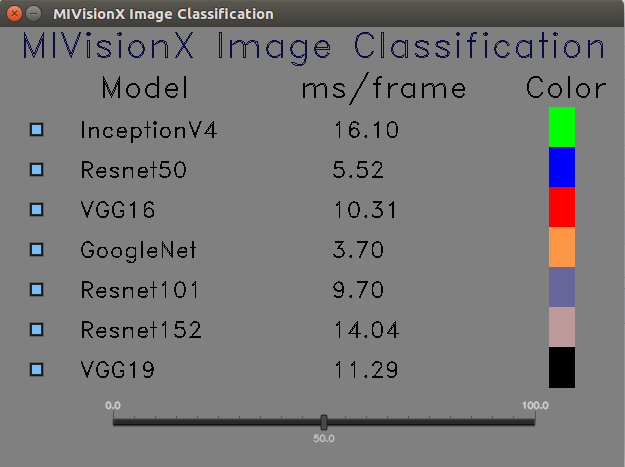
## MIVisionX Image Classification Control
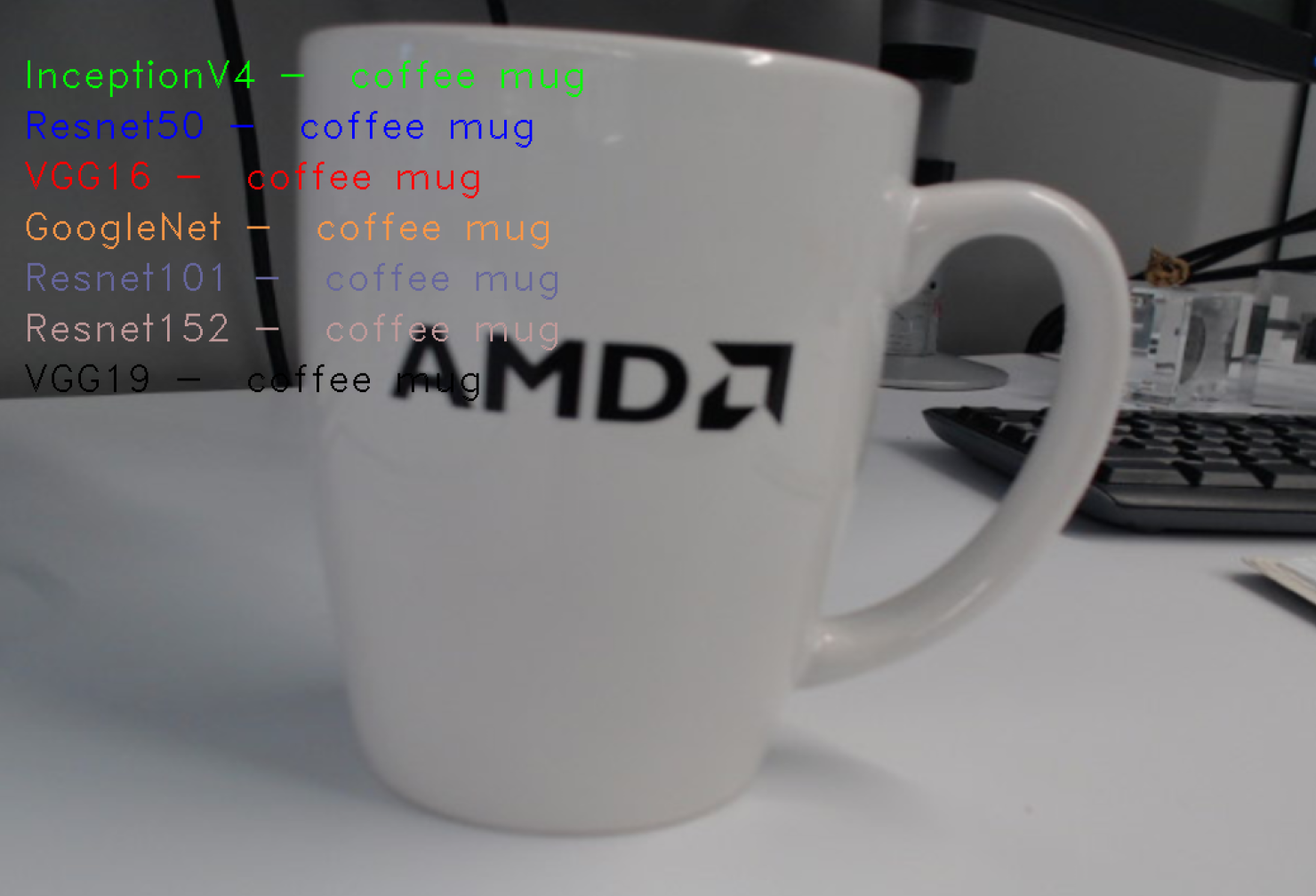
## MIVisionX Image Classification
## Usage
### Prerequisites
* Ubuntu `16.04`/`18.04` or CentOS `7.5`/`7.6`
* [ROCm supported hardware](https://rocm.github.io/ROCmInstall.html#hardware-support)
* [ROCm](https://github.com/RadeonOpenCompute/ROCm#installing-from-amd-rocm-repositories)
* Build & Install [MIVisionX](https://github.com/GPUOpen-ProfessionalCompute-Libraries/MIVisionX#linux-1)
### Build
````
git clone https://github.com/GPUOpen-ProfessionalCompute-Libraries/MIVisionX.git
cd MIVisionX/apps/mivisionx_openvx_classifier
mkdir build
cd build
cmake ../
make
````
### Run
```
Usage: ./classifier
--label [required]
--video / --capture <0> [required]
--googlenet [optional]
--inception [optional]
--resnet50 [optional]
--resnet101 [optional]
--resnet152 [optional]
--vgg16 [optional]
--vgg19 [optional]
```
**Note*** All the models are optional, but one of the supported model weights.bin is required
### Supported Models
* [GoogleNet](http://www.cs.bu.edu/groups/ivc/data/SOS/GoogleNet_SOS.caffemodel)
* [InceptionV4](https://github.com/soeaver/caffe-model/tree/master/cls#performance-on-imagenet-validation)
* [ResNet50](https://github.com/KaimingHe/deep-residual-networks#deep-residual-networks)
* [ResNet101](https://github.com/KaimingHe/deep-residual-networks#deep-residual-networks)
* [ResNet152](https://github.com/KaimingHe/deep-residual-networks#deep-residual-networks)
* [VGG16](http://www.robots.ox.ac.uk/~vgg/software/very_deep/caffe/VGG_ILSVRC_16_layers.caffemodel)
* [VGG19](http://www.robots.ox.ac.uk/%7Evgg/software/very_deep/caffe/VGG_ILSVRC_19_layers.caffemodel)
#### Generating weights.bin for different Models
1. Download or train your own caffemodel for the supported models listed above.
Here is the sample download [link](https://github.com/SnailTyan/caffe-model-zoo) that contains all the prototxt:
2. Use [MIVisionX Model Compiler](https://github.com/GPUOpen-ProfessionalCompute-Libraries/MIVisionX/tree/master/model_compiler#neural-net-model-compiler--optimizer) to extract weights.bin from the pre-trained caffe models
**Note:** MIVisionX installs all the model compiler scripts in `/opt/rocm/mivisionx/model_compiler/python/` folder
* Convert the pre-trained caffemodel into AMD NNIR model:
````
% python /opt/rocm/mivisionx/model_compiler/python/caffe_to_nnir.py --input-dims [--verbose <0|1>]
````
Sample:
````
% python /opt/rocm/mivisionx/model_compiler/python/caffe_to_nnir.py VGG_ILSVRC_16_layers.caffemodel VGG16_NNIR --input-dims 1,3,224,224
````
* Convert an AMD NNIR model into OpenVX C code:
````
% python /opt/rocm/mivisionx/model_compiler/python/nnir_to_openvx.py
````
Sample:
````
% python /opt/rocm/mivisionx/model_compiler/python/nnir_to_openvx.py VGG16_NNIR VGG16_OpenVX
````
**Note:** The weights.bin file will be generated inside the OpenVX folder and you can use that as an input for this project.
#### --label
Use [labels.txt](data/labels.txt) or [simple_labels.txt](data/simple_labels.txt) file in the data folder
#### --video
Run classification on pre-recorded video with this option.
#### --capture <0>
Run classification on the live camera feed with this option.
**Note:** --video and --capture options are not supported concurrently
### Sample Runs
#### Run VGG 16 Classification on Live Video
* **Step 1:** Install all the Prerequisites
**Note:** MIVisionX installs all the model compiler scripts in `/opt/rocm/mivisionx/model_compiler/python/` folder
* **Step 2:** Download pre-trained VGG 16 caffe model - [VGG_ILSVRC_16_layers.caffemodel](http://www.robots.ox.ac.uk/~vgg/software/very_deep/caffe/VGG_ILSVRC_16_layers.caffemodel)
* **Step 3:** Use MIVisionX Model Compiler to extract weights.bin file from the pre-trained caffe model
* Convert .caffemodel to NNIR
````
% python /opt/rocm/mivisionx/model_compiler/python/caffe_to_nnir.py VGG_ILSVRC_16_layers.caffemodel VGG16_NNIR --input-dims 1,3,224,224
````
* Convert NNIR to OpenVX
````
% python /opt/rocm/mivisionx/model_compiler/python/nnir_to_openvx.py VGG16_NNIR VGG16_OpenVX
````
**Note:** Use weights.bin generated in VGG16_OpenVX folder to run the classifier on live video
```
./classifier --label PATH_TO/labels.txt
--capture 0
--vgg16 PATH_TO/VGG16_OpenVX/weights.bin
```
#### Run Multi-Model Classification on Live Video
Follow the steps above to generate weigths.bin files for the supported models and run them concurrently on a live video
```
./classifier --label PATH_TO/labels.txt
--capture 0
--resnet50 PATH_TO/ResNet50_OpenVX/weights.bin
--vgg16 PATH_TO/VGG16_OpenVX/weights.bin
--vgg19 PATH_TO/VGG19_OpenVX/weights.bin
```